Exports looks low res
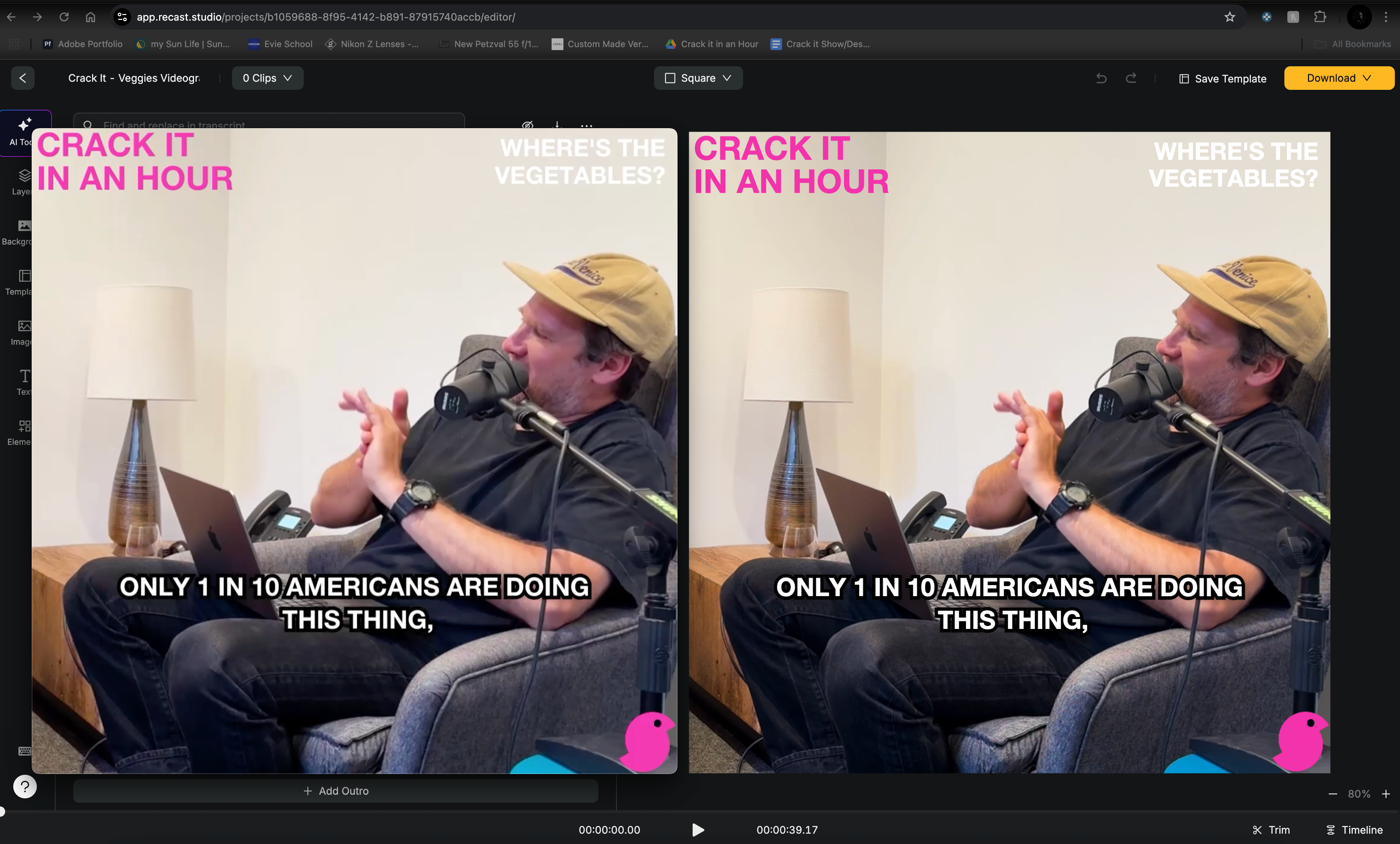
I am uploading full 1080p res video, when I’m working within Recast to edit the file, add captions, etc. the quality seems great - however even though I’m exporting at 1080p, the quality of the video is diminished and looks low resolution.
Please see the attached screenshot - on the left is exported mp4 in quicktime and on the right is the editing mode in Recast, you can see the lack of definition in the text/captions and the host’s face, not to mention some issues with colour reproduction (noticeable difference in pinks). I have been very impressed with the quality Recast’s captions, however the lower resolution exports is making me consider other products.
Log in to comment and vote
Comments3
Nathan
Aug 7, 2025
I think the colour reproduction is closer to quicktime, however the colour is a minor issue in comparison to the resolution issue - it is clearly downgraded on export despite selecting 1080p quality.
Abhinav Sohani
Aug 7, 2025
Could you please confirm if the video linked below looks better?
https://s3.amazonaws.com/recast-input/2578bebd-66f4-4c8b-9472-4b78f1a5bc1a/54e2d4ac-fb36-4183-a96a-accdfd5bbfe2/2025-08-08/CopyCrackItVeggiesVideogram1_B28Ox9JM.mp4
Abhinav Sohani
Aug 7, 2025
Hi Natahn,
Thanks a lot for sharing the detailed feedback.
I understand your concern, and let me try to address those:
You're right, there is a difference in the editor preview compared to the rendered video. It mainly depends on how different media players interpret color. Please see the images below.
Quicktime:
VLC:
Browser:
I would appreciate it if you could share how the video appears on the social media platform when you upload it. Is it the same as the QuickTime player or different?